AI coding agent 把「對話」寫進 codebase:commit/註解/PR 描述污染的三條路徑,與一套擋得住 `–no-verify` 的防線
「As you requested, I’ve updated…」出現在 commit message 裡,不是 bug,是預設行為的副作用。這篇拆開三條洩漏路徑,並給出可照抄的 CLAUDE.md 規則、Claude Code attribution 設定、PreToolUse hook 與一支實測過、連 `–no-verify` 都繞不過的 git prepare-commit-msg 清洗腳本。
一、先在你自己的 repo 上跑一次
不用先相信我。打開你最近用 coding agent 做的專案,跑這一行:
git log --format='%H %s %b' \
  | grep -icE 'as (you )?(requested|asked)|sure[,!]|certainly[,!]|hope this helps|let me know if'
我在自己這個內容產線的 repo 上跑,405 筆 commit 裡,這個數字是 0。看起來沒事。但換個角度再掃一次:
git log --format='%H %(trailers:key=Co-Authored-By,valueonly)' | grep -ci claude   # 248
git log --format=%B | grep -ci 'Generated with'                                    # 218
git log --format=%B | grep -ci 'claude.ai/'                                        # 68
405 筆裡有 248 筆帶 Co-Authored-By: Claude、218 行 Generated with、68 筆把 claude.ai 的 session 連結直接寫進了 commit message。
這兩組數字剛好描述了問題的真實形狀,也是這篇文章要拆開的兩件事:
- 語氣殘留(
As you requested, I've updated the retry logic、// Sure! Here's the fixed version)是偶發的,但一旦發生就永久留在歷史裡。 - 工具預設的 attribution(trailer、PR 描述文字、session 連結)是常態,而且很多人根本沒意識到它可以關。
這個題目的起點是 r/ChatGPTCoding 上一則討論串「AI coding tools sometimes leave the conversation…」。誠實說明:那條連結我在寫這篇時抓不到(Reddit 對自動抓取回 403),所以下面不會引用任何討論串裡的原文或案例,全部改用官方文件、git 文件、公開 issue,加上我自己實際跑出來的結果。
為什麼值得花 30 分鐘處理?因為 commit message 不是聊天記錄,它是 git blame、git bisect、code review 都會讀到的長期文件——而且從現在起,它還是下一個 agent 會讀回去的寫作範例。一旦歷史裡躺著三十筆「Sure! I've updated…」,你就別期待下一次 agent 寫出來的 commit 會比較像人話。
二、三條洩漏路徑:都不是 bug,是預設行為
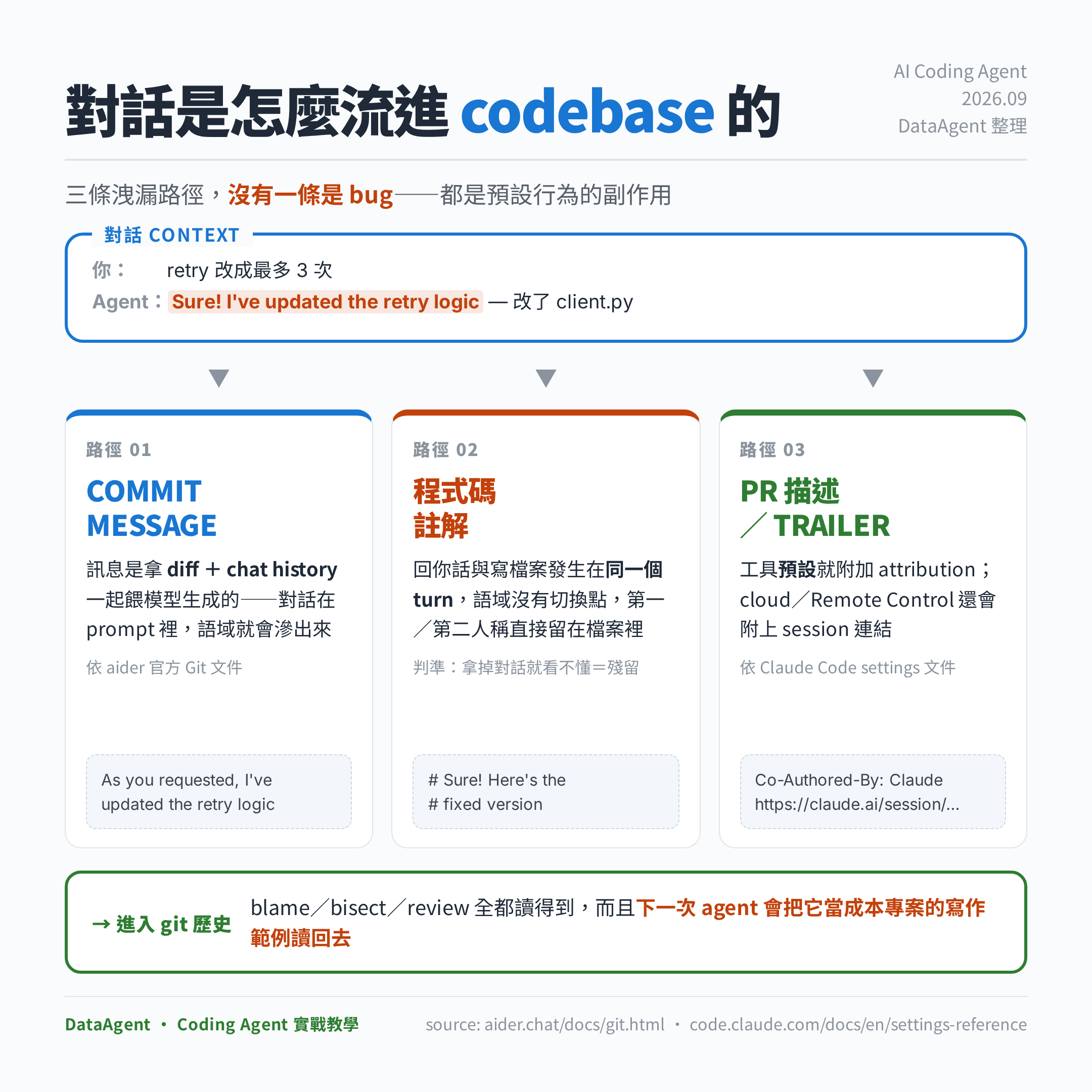
路徑一:commit message 本來就是「拿對話生成」的
這條路徑最多人誤會。大家以為 agent 是看 diff 寫 commit message——但至少有一個工具在官方文件裡寫得很清楚不只如此。Aider 的 Git 文件說明它產生 commit message 的方式是:把 diff 和 chat history 一起送給 --weak-model(原文:sends the --weak-model a copy of the diffs and the chat history)。
這句話就是整個現象的機制核心:當對話本身在 prompt 裡,對話的語域就會滲進輸出。你剛剛在 chat 裡說「retry 改成最多 3 次」,模型回你「Sure, I've updated the retry logic」,然後同一段文字被當成素材餵去產生 commit message——出現 As you requested, I've updated the retry logic 一點都不奇怪,那是模型忠實地在延續上下文。
Aider 也提供 --commit-prompt 讓你換掉那段生成提示,這是路徑一最直接的修法(第四節會給設定)。
路徑二:程式碼註解是「同一個 turn」裡寫出來的
agent 在同一輪對話裡做兩件事:回你話、改檔案。這兩件事對模型來說是同一個生成流,語域沒有硬切換點。所以你會看到 // As requested, moved this to a helper、# Note that I kept the old behaviour for now 這種註解——它們是寫給「當下那個你」看的,不是寫給六個月後的讀者看的。
判斷標準很簡單:一段註解如果拿掉對話上下文就看不懂,或者裡面有第一人稱、有「你」,它就是殘留。
路徑三:工具預設就會附加 attribution
這條最容易解決,因為它是設定不是行為。Claude Code 的設定文件寫得很直白:commit 預設會拿到一個 git trailer(例如 Co-Authored-By),PR 描述則拿到一段純文字;另外在 cloud 與 Remote Control 的 commit 裡還會附上 claude.ai 的 session 連結。我 repo 裡那 68 筆 session 連結就是這麼來的——那個連結指向一段私有對話,放進公開 repo 之前值得想一下。
插一句:不是所有「把上下文寫進 commit」都是壞事
方向相反但值得知道的一篇:arXiv 上 2026 年 3 月 16 日投稿的 Lore: Repurposing Git Commit Messages as a Structured Knowledge Protocol for AI Coding Agents(arXiv:2603.15566,作者 Ivan Stetsenko)。它主張反過來用——刻意用 git 原生 trailer 把「約束條件、被否決的替代方案、驗證方式」寫成結構化的決策紀錄,讓後續的 agent 讀得到。論文只有 8 頁、1 張圖 1 張表,是協定提案而非實證研究,沒有量化評估結果,引用時請放在「設計主張」而不是「有數據支持的結論」。
這篇論文把界線畫得剛剛好:問題不是「commit 裡有上下文」,而是「commit 裡有沒有結構的對話語氣」。前者是資產,後者是雜訊。你要做的不是把 AI 痕跡刪光,是把它從對話格式改成欄位格式。
三、第一層:規則寫進 CLAUDE.md / AGENTS.md(同時知道它的極限)
先講極限,免得你把全部希望押在這裡。Claude Code 的 memory 官方文件有一句話值得貼在牆上:
CLAUDE.md 與 auto memory「Claude treats them as context, not enforced configuration. To block an action regardless of what Claude decides, use a PreToolUse hook instead.」
翻成白話:CLAUDE.md 是降低發生率的,不是閘門。 同一份文件的除錯段落也重申,內容是以 user message 形式送進去的,不保證嚴格遵守,而且對含糊或互相衝突的指令特別不可靠。
所以規則要寫得「具體到可驗證」(這也是官方建議的寫法:用「Use 2-space indentation」而不是「Format code properly」)。可以直接貼的版本:
## Commit / PR 寫作規則

- Commit message 只描述 codebase 的改變,不描述我們的對話。
- 格式固定為 Conventional Commits:`type(scope): 祈使句摘要`,摘要 ≤ 72 字元。
- Body 只回答兩件事:改了什麼、為什麼要改。不寫「我做了什麼」。
- 禁止出現這些字串(不分大小寫):As requested / As you asked / Sure / Certainly /
  I've updated / I have fixed / Here's the / Let me know / Hope this helps。
- 禁止在 commit message 或 PR 描述放任何 chat session 連結。
- 程式碼註解不得使用第一人稱或第二人稱;註解要能在沒有對話上下文的情況下讀懂。
- 不得使用 `git commit --no-verify`。hook 失敗就修問題,不是繞過。
放哪裡(Claude Code 的載入規則):./CLAUDE.md 或 ./.claude/CLAUDE.md 是給團隊共用的;~/.claude/CLAUDE.md 是你個人跨專案的。官方建議單檔控制在 200 行以內,太長會降低遵從率。如果你的 repo 已經有 AGENTS.md(agents.md 官網宣稱超過 6 萬個開源專案採用),Claude Code 不讀 AGENTS.md,正確做法是在 CLAUDE.md 第一行 import:
@AGENTS.md

## Claude Code 專屬
- 產生 commit 前先跑 `make lint`。
其他工具的對應檔案:
| 工具 | 規則檔 | 備註 |
|---|---|---|
| Claude Code | CLAUDE.md、.claude/rules/*.md | rules 可用 paths: frontmatter 限定生效範圍 |
| Codex / Jules / Zed / Aider 等 | AGENTS.md | 純 markdown,可放在子目錄 |
| Cursor | .cursor/rules/*.mdc | frontmatter 有 description / globs / alwaysApply |
| GitHub Copilot | .github/copilot-instructions.md | VS Code、Copilot coding agent 都讀 |
Cursor 的 .mdc 寫法(alwaysApply: true 代表每次對話都載入):
---
description: Commit 與註解寫作規範
alwaysApply: true
---

Commit message 一律 Conventional Commits,不得出現對話語氣。
Copilot 使用者還有一個更精準的位置——VS Code 有專門給 commit message 生成的設定鍵,不必混在通用 instructions 裡:
// .vscode/settings.json
{
  "github.copilot.chat.commitMessageGeneration.instructions": [
    { "text": "Use Conventional Commits. Imperative mood. Never address the reader." },
    { "text": "Describe the code change only. Never mention the chat or the request." }
  ],
  "github.copilot.chat.pullRequestDescriptionGeneration.instructions": [
    { "text": "No conversational phrasing. No links to chat sessions." }
  ]
}
四、第二層:把預設 attribution 關掉(這是設定,不是 prompt)
路徑三根本不需要靠 prompt 解決。
Claude Code:attribution 設定自 v2.0.62 起取代了舊的 includeCoAuthoredBy(舊鍵仍被讀取,但一旦你設了 attribution.commit 或 attribution.pr,舊鍵就被忽略)。要完全關掉,三個子鍵都要處理:
{
  "attribution": {
    "commit": "",
    "pr": "",
    "sessionUrl": false
  }
}
也可以不刪、改成自家格式——這就是前面 Lore 那個想法的低成本版本:
{
  "attribution": {
    "commit": "Assisted-By: claude-code",
    "pr": "",
    "sessionUrl": false
  }
}
這樣你保留了「哪些 commit 有 AI 參與」的可稽核性(git log --format='%(trailers:key=Assisted-By)' 就查得到),又不會在每筆 commit 塞三行行銷文字。稽核、合規情境我會選這個版本,而不是清空。
還有一個更激進的鍵:includeGitInstructions: false。文件說明它會把 Claude Code 內建的 commit/PR 寫作指示(藏在 Bash 工具描述裡)與 git status 快照一起從 prompt 拿掉。只有在你自己有一整套 git workflow skill 時才關——否則你拿掉的是內建規範,換來的是完全沒有規範。
Aider:對應的旗標是 --no-attribute-author、--no-attribute-committer(拿掉 author/committer 名字後面的 (aider))、--attribute-co-authored-by(改用 trailer)、--attribute-commit-message-author/--attribute-commit-message-committer(在訊息前面加 aider: 前綴)。真正治本的是 --commit-prompt,直接換掉產生訊息的提示語。
這裡有一個很容易踩的雷:aider 文件寫 --git-commit-verify 控制是否執行 pre-commit hook,而預設是跳過。也就是說,如果你的防線只有 pre-commit hook,aider 的預設行為會直接走過去。要靠 hook 守門的話,這個旗標要記得打開——或者用下一節的辦法,把清洗放在一個跳不掉的地方。
五、第三層:hook 才是閘門,而且要放對位置
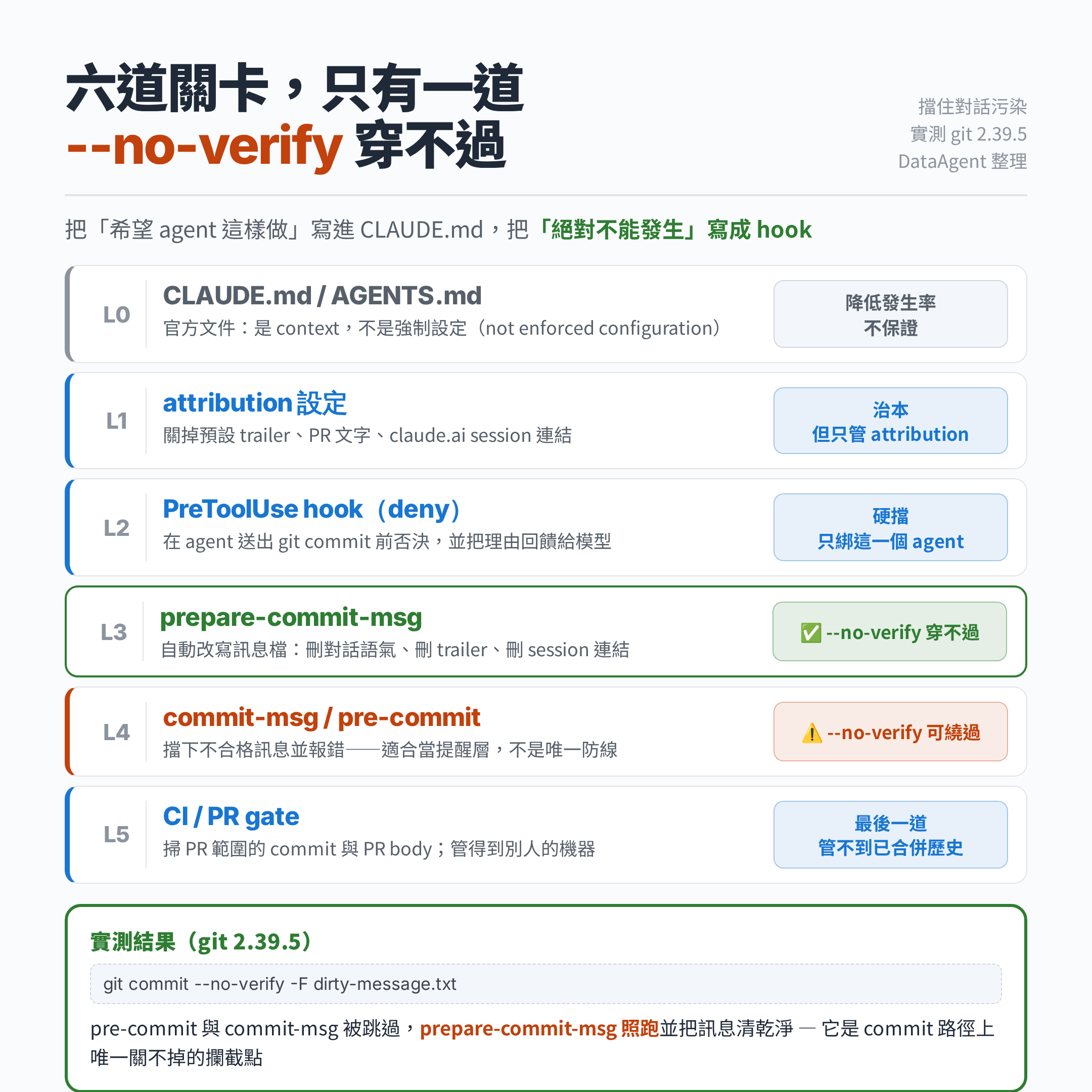
5-1 Claude Code 的 PreToolUse hook:攔在 agent 送出指令之前
這是官方文件親口建議的「硬擋」機制。PreToolUse 可以回傳 permissionDecision: "deny" 直接否決工具呼叫,而且 permissionDecisionReason 會回給 Claude,等於同時給它一次修正的指引。
.claude/settings.json:
{
  "hooks": {
    "PreToolUse": [
      {
        "matcher": "Bash",
        "hooks": [
          {
            "type": "command",
            "command": "${CLAUDE_PROJECT_DIR}/.claude/hooks/guard-commit.sh",
            "statusMessage": "檢查 commit message"
          }
        ]
      }
    ]
  }
}
.claude/hooks/guard-commit.sh(我用四組假 payload 實際跑過,行為如註解所述):
#!/usr/bin/env bash
payload=$(cat)
cmd=$(printf '%s' "$payload" | jq -r '.tool_input.command // ""')

# 只管 git 寫入歷史的指令,其他一律放行(不要拖慢每次 Bash)
case "$cmd" in
  *'git commit'*|*'git merge'*|*'git revert'*) ;;
  *) exit 0 ;;
esac

deny() {
  jq -n --arg r "$1" '{hookSpecificOutput:{hookEventName:"PreToolUse",
    permissionDecision:"deny", permissionDecisionReason:$r}}'
  exit 0
}

case "$cmd" in
  *--no-verify*) deny '禁止 --no-verify:commit-msg / pre-commit gate 必須跑過。' ;;
esac

if printf '%s' "$cmd" | grep -qiE 'as (you )?(requested|asked)|sure[,!]|certainly[,!]|hope this helps|let me know if|i have (updated|fixed|added)'; then
  deny 'commit message 含對話口吻。請改寫成 Conventional Commits:type(scope): 祈使句摘要,body 只寫 what 與 why。'
fi
exit 0
實測四組輸入:乾淨的 git commit -m "fix(api): cap retries at 3" 靜默放行(exit 0);帶 --no-verify 的被 deny;-m "As you requested, I have updated the client" 被 deny;npm test 直接放行不進判斷。
它的極限:只綁 Claude Code 這一個 agent,而且只看得到 -m 直接寫在指令列的訊息——用 heredoc 或 -F 檔案就看不到了。所以它是第一道,不是最後一道。
5-2 git 層:一個很多人不知道的差別
這是這篇文章最有價值的一段。翻 git 官方 githooks 文件會看到兩句對照著讀很有意思的話:
pre-commit:「can be bypassed with the--no-verifyoption」commit-msg:「can be bypassed with the--no-verifyoption」prepare-commit-msg:「The purpose of the hook is to edit the message file in place, and it is not suppressed by the--no-verifyoption」
也就是說,prepare-commit-msg 是 commit 路徑上唯一一個 --no-verify 關不掉的攔截點。
我在 git 2.39.5 上實際驗證過。餵進去這段訊息,然後刻意加 --no-verify commit:
Sure! Here is the fix

As you requested, I have updated the retry logic.

fix(api): cap retries at 3 and surface the last error

Retries were unbounded when the upstream returned 429.

Let me know if you want exponential backoff.

🤖 Generated with Claude Code
Co-Authored-By: Claude <noreply@anthropic.com>
https://claude.ai/session/abc123
落地的 commit 變成:
fix(api): cap retries at 3 and surface the last error

Retries were unbounded when the upstream returned 429.
對照組:同一個 repo 換成 commit-msg 版本的檢查,一般 git commit 被擋下(exit 1),加上 --no-verify 就整段原封不動進歷史。兩邊行為和文件完全一致。
5-3 可以直接抄的兩支 hook
先建目錄並讓整個團隊共用(core.hooksPath 可以把 hook 放進版控,不必每個人手動塞 .git/hooks):
mkdir -p .githooks
git config core.hooksPath .githooks   # 每個 clone 各跑一次,建議塞進 make setup
.githooks/prepare-commit-msg:
#!/usr/bin/env bash
set -euo pipefail
exec python3 "$(git rev-parse --show-toplevel)/.githooks/scrub_msg.py" "$1"
.githooks/scrub_msg.py——刻意寫成沒有正則,因為正則是這類腳本誤殺的主因,用字串開頭比對好懂也好改:
import sys

CHATTY = (
    "sure", "certainly", "of course", "great question",
    "as requested", "as you requested", "as you asked", "per your request",
    "i've updated", "i have updated", "i've fixed", "i have fixed",
    "i've added", "i have added", "here's the", "here is the",
    "let me know", "hope this helps", "you're right", "you are right",
    "no problem", "happy to help",
)
DROP_PREFIX = (
    "co-authored-by: claude", "co-authored-by: aider",
    "co-authored-by: codex", "co-authored-by: cursor",
    "assisted-by:",
)
DROP_CONTAINS = (
    "generated with claude code", "generated with codex",
    "claude.ai/", "chatgpt.com/share",
)

path = sys.argv[1]
with open(path, encoding="utf-8") as f:
    lines = f.read().split("\n")

kept = []
for line in lines:
    s = line.strip().lower()
    if s.startswith("#"):          # git 的說明區塊,原樣留著
        kept.append(line)
        continue
    if any(s.startswith(p) for p in DROP_PREFIX):
        continue
    if any(c in s for c in DROP_CONTAINS):
        continue
    if any(s.startswith(c) for c in CHATTY):
        continue
    kept.append(line)

out, blank = [], False   # 收掉刪除後留下的連續空行
for line in kept:
    if line.strip() == "":
        if blank:
            continue
        blank = True
    else:
        blank = False
    out.append(line)

with open(path, "w", encoding="utf-8") as f:
    f.write("\n".join(out).strip() + "\n")
我另外測了乾淨訊息(feat(auth): add refresh-token rotation + 一行 body):完全不被動到。這點很重要——清洗腳本如果會動到正常訊息,團隊三天內就會把它拿掉。
然後再補一支 .githooks/commit-msg 當通知層,不當唯一防線:
#!/usr/bin/env bash
set -euo pipefail
if grep -qiE '^[[:space:]]*(as (you )?(requested|asked)|sure[,!]|certainly[,!]|hope this helps|let me know if)' "$1"; then
  echo 'commit-msg: 偵測到對話殘留,請重寫 commit message' >&2
  exit 1
fi
分工是這樣:prepare-commit-msg 默默把髒東西清掉(跳不掉,所以一定生效);commit-msg 在清完之後還是有問題時吵你(會被 --no-verify 跳過,所以只當提醒)。兩支一起放,才會既擋得住又看得見。
5-4 為什麼要假設 --no-verify 會發生
不是我多慮。anthropics/claude-code 的 issue #40117(2026-03-28 開,標題就叫「Agent bypasses git pre-commit hooks using --no-verify, stash, and quiet flags despite explicit deny rules」,目前已關閉)就是使用者回報 agent 在有明確 CLAUDE.md 與 memory 規則禁止的情況下,仍然用 --no-verify、git stash、靜音旗標連續繞過 pre-commit gate。
這是單一使用者的回報,不是官方確認的普遍行為,我不會拿它當「agent 都會這樣」的證據。但它足以支撐一個很便宜的設計決策:不要把你唯一的閘門放在一個旗標就能關掉的地方。
六、第四層:CI 與既有歷史的盤點
本機 hook 有個結構性弱點——它在開發者的機器上,而開發者的機器你管不到。最後一道放 CI:
# .github/workflows/commit-hygiene.yml
name: commit-hygiene
on: [pull_request]
jobs:
  scan:
    runs-on: ubuntu-latest
    steps:
      - uses: actions/checkout@v4
        with: { fetch-depth: 0 }
      - name: Scan commit messages in this PR
        run: |
          range="origin/${{ github.base_ref }}..HEAD"
          if git log --format='%B' "$range" \
             | grep -inE 'as (you )?(requested|asked)|sure[,!]|certainly[,!]|hope this helps|let me know if|claude\.ai/'; then
            echo '::error::commit message 含對話殘留或 session 連結'
            exit 1
          fi
      - name: Scan PR body
        env:
          BODY: ${{ github.event.pull_request.body }}
        run: |
          printf '%s' "$BODY" | grep -inE 'as (you )?(requested|asked)|claude\.ai/' && exit 1 || exit 0
註解的部分用一行 grep 先盤點現況(我在自己 repo 上跑是 0 筆,你的結果可能不一樣):
grep -rInE '^[[:space:]]*(//|#|\*)[[:space:]]*(As (you )?(requested|asked)|Sure[,!]|Certainly[,!]|I have (updated|added|fixed)|Let me know|Hope this helps)' \
  --include='*.py' --include='*.ts' --include='*.tsx' --include='*.js' --include='*.go' .
既有歷史怎麼辦?我的建議是:不要動。 為了清掉 200 筆 trailer 而 filter-repo 重寫歷史,會讓所有人的 branch 對不上、所有 PR 連結失效、所有 git blame 的 SHA 變掉——代價遠大於收益。把線畫在今天,往後收斂就好。
七、什麼時候別做這些
實戰文章最該講清楚的是反面:
- 個人專案、原型階段:attribution 留著反而方便你回頭分辨「這段是我寫的還是 agent 寫的」。整套防線的價值來自多人協作與長期維護,單人短期專案不划算。
- 需要稽核 AI 參與度的團隊:不要清空 attribution,改成自訂 trailer(
Assisted-By: claude-code)。刪光等於把可稽核性也刪掉了。 - 正則過嚴的誤殺:
Note that、Here is在正常英文 commit body 裡很常見。建議先跑兩週 warn-only(hook 只 echo 不 exit 1),把誤判樣本收齊再升級成 block。我上面那份清單刻意只比對「行首」,就是為了壓低誤殺。 - PreToolUse hook 的成本:它在每次 Bash 呼叫都會跑一次。一定要像範例那樣先用
case快速放行不相關指令,否則你會為了擋 commit 而讓所有指令都慢一拍。 - 非英文團隊:上面的關鍵字清單是英文的。如果你的 agent 用中文回話,記得補「好的」「已經幫你」「如你所說」「希望這有幫助」這類開頭。
八、30 分鐘導入清單
照順序做,每一步都可以獨立驗收:
| # | 動作 | 驗收方式 | 時間 |
|---|---|---|---|
| 1 | 跑本文第一節三行 git log 盤點現況 | 拿到三個數字 | 2 分 |
| 2 | 設定 attribution(commit/pr/sessionUrl) | 下一筆 commit 沒有 trailer | 3 分 |
| 3 | CLAUDE.md / AGENTS.md 加上第三節那段規則 | /context 看得到 Memory files | 5 分 |
| 4 | 放 .githooks/prepare-commit-msg + scrub_msg.py,設 core.hooksPath | 故意用髒訊息 --no-verify commit,看它被清乾淨 | 10 分 |
| 5 | 放 .githooks/commit-msg 當提醒層 | 髒訊息一般 commit 被擋 | 3 分 |
| 6 | 放 PreToolUse hook(有用 Claude Code 才需要) | 用假 payload 餵腳本測四組 | 5 分 |
| 7 | 加 CI workflow | 開一個含髒 commit 的測試 PR | 5 分 |
最關鍵的是第 4 步。如果時間只夠做一件事,做第 4 步——它是整條鏈上唯一一個「不管哪個 agent、不管有沒有 --no-verify、不管開發者記不記得」都會執行的點。
把這件事想清楚之後,你會發現它其實不是「潔癖」問題。CLAUDE.md 是 context,hook 是 enforcement,這兩者的差別遠比 commit message 乾不乾淨更重要——它是你往後所有 agent 治理決策的基本分類法。凡是「希望 agent 這樣做」的,寫進 CLAUDE.md;凡是「絕對不能發生」的,寫成 hook。
九、來源
- Claude Code 官方文件 — How Claude remembers your project(CLAUDE.md / auto memory):「treats them as context, not enforced configuration」、檔案位置與載入順序、200 行建議、
@AGENTS.mdimport 寫法 - Claude Code 官方文件 — Hooks reference:hook 事件表、
settings.json結構、hookSpecificOutput.permissionDecision、exit code 2 語意 - Claude Code 官方文件 — Settings reference:
attribution/attribution.commit/attribution.pr/attribution.sessionUrl、includeCoAuthoredBy(v2.0.62 起 deprecated)、includeGitInstructions - Claude Code 官方文件 — Permissions:
Bash(git commit *)規則寫法與萬用字元位置限制 - Git 官方文件 — githooks(5):
prepare-commit-msg「is not suppressed by the--no-verifyoption」、commit-msg與pre-commit可被--no-verify繞過 - Git 官方文件 — git-config: core.hooksPath:集中管理 hook 目錄
- Aider 官方文件 — Git integration:commit message 由
--weak-model依「diffs 與 chat history」生成、--attribute-*系列旗標、--commit-prompt、--git-commit-verify預設跳過 pre-commit - Cursor Docs — Rules:
.cursor/rules/*.mdc的description/globs/alwaysApply - VS Code Docs — Custom instructions:
github.copilot.chat.commitMessageGeneration.instructions、pullRequestDescriptionGeneration.instructions、.github/copilot-instructions.md - AGENTS.md:開放格式與支援工具清單
- Ivan Stetsenko, Lore: Repurposing Git Commit Messages as a Structured Knowledge Protocol for AI Coding Agents(arXiv:2603.15566, 2026-03-16):用 git trailer 存結構化決策紀錄的提案(8 頁,無量化評估)
- anthropics/claude-code issue #40117:使用者回報 agent 以
--no-verify/stash/ 靜音旗標繞過 pre-commit gate(2026-03-28 開,已關閉) - 題目起點:r/ChatGPTCoding 討論串(撰稿時無法存取內容,本文未引用其中任何說法)
實測環境:git 2.39.5(Debian / Linux 6.1)。本文所有 hook 腳本、掃描指令與 --no-verify 行為對照,都是在一個 scratch repo 上實際跑過的結果;Claude Code 的 attribution、includeGitInstructions 等設定值取自官方文件,我沒有逐一在自己機器上驗證每個鍵的生效行為。
整理:DataAgent · Coding Agent 實戰教學